
What Devices Can Play Minecraft? An Easy Guide
What devices can play Minecraft? This easy guide helps parents explore their options and understand what they need to play online as a family.
Table of Contents
Introduction: What devices can play Minecraft?
Wondering what devices can play Minecraft? I was confused too! When we started playing as a family, figuring out which version to buy and what everyone needed to connect felt like a project of its own. In this guide, I’ll walk you through the options for computers, consoles, phones, and tablets, explain Bedrock vs. Java, and break down which devices require a paid subscription to play online. My goal is to help you spend less time figuring it out and more time playing together!
New to gaming with your kids? My parent’s guide to healthy gaming shares how we approach screen time in our home
Minecraft Bedrock vs. Java: Know the Difference Before Choosing a Device
Before we talk about what devices can play Minecraft, you need to know that there are two main editions: Bedrock and Java. Both offer the building, exploring, and adventures your kids love, but they work on different devices and that affects who can play together.
Minecraft Bedrock Edition
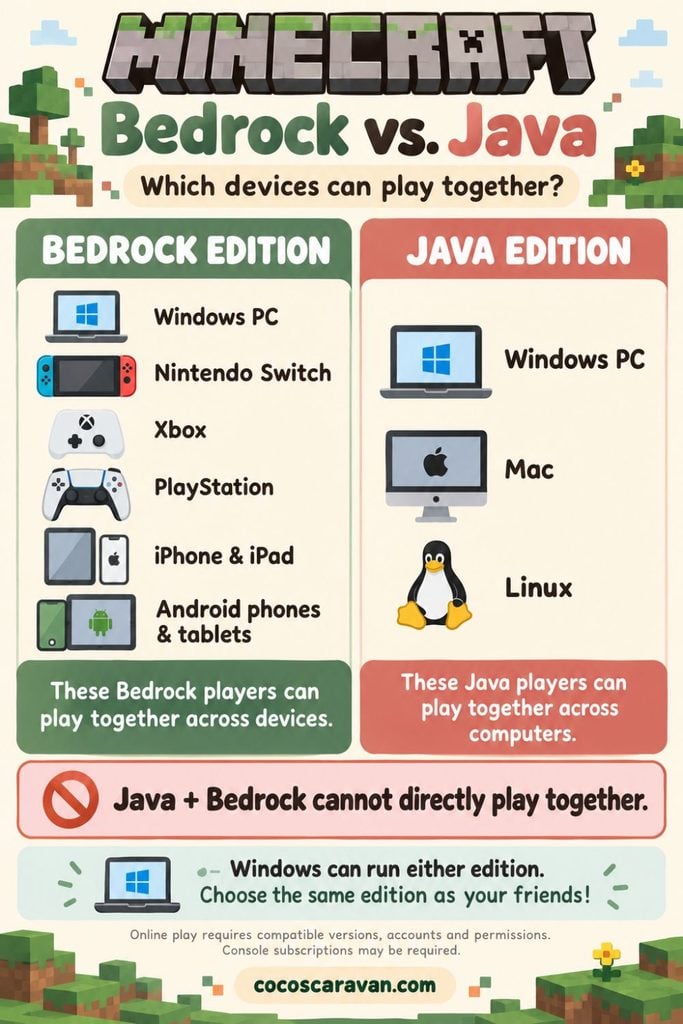
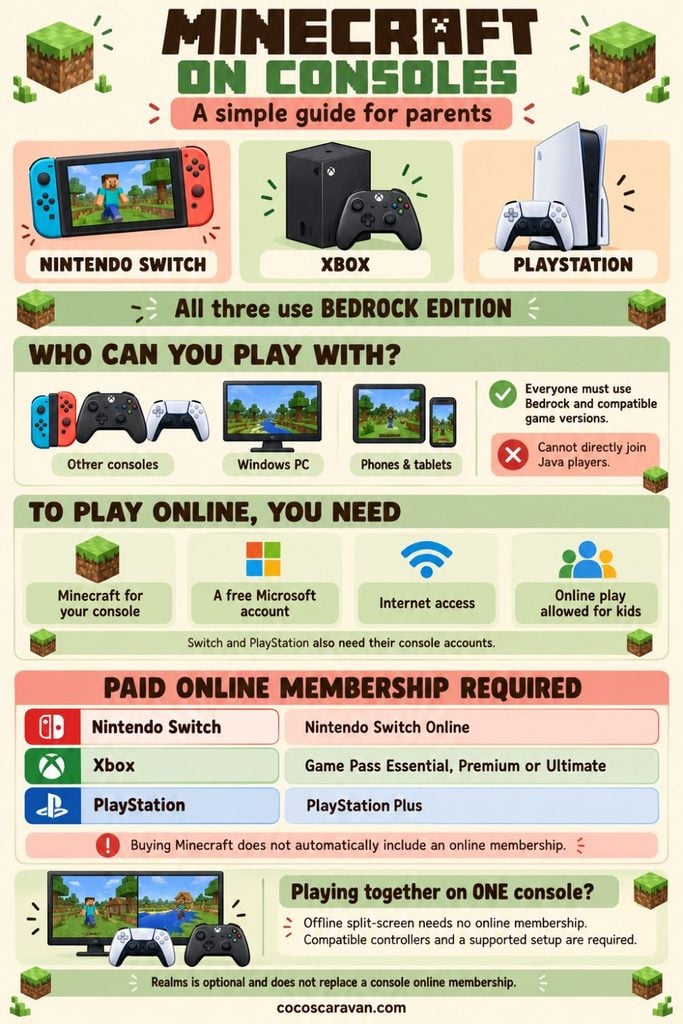
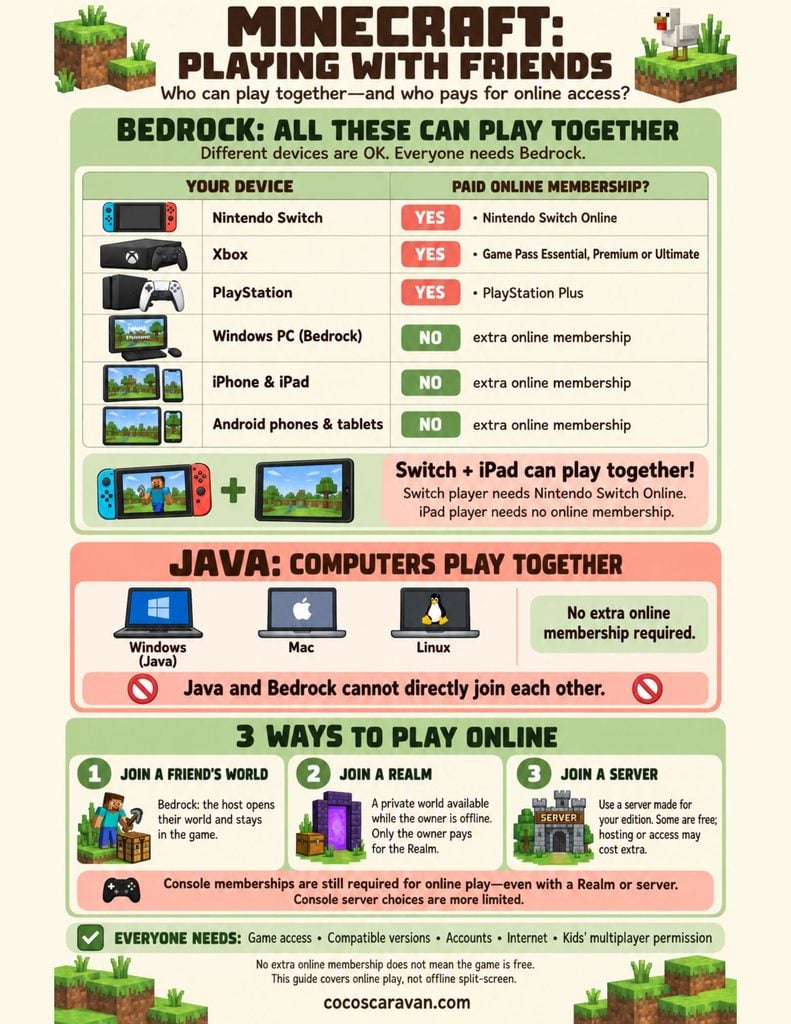
Bedrock is available on Nintendo Switch, Xbox, PlayStation, Windows computers, and supported phones and tablets. Its biggest benefit for families is cross-platform play, which means you can play together even when you’re using different types of devices. Someone on a Switch can join someone on an Xbox! This is the edition we use for our family’s Xbox and Switch setup. Everyone still needs the required accounts, multiplayer permissions, and any online subscriptions their device requires.
Minecraft Java Edition
Java is available on Windows, Mac, and Linux computers. Java players can play together across those computer types, but Java and Bedrock cannot directly join each other’s games through standard multiplayer. That means someone playing Java on a computer can’t simply join your child playing Bedrock on a Switch. Windows computers can run either edition, so it’s important to launch the right one.
For our family, Bedrock makes sense because we play on different consoles. Before buying Minecraft, check which edition the friends or family you want to join are using!
What Do You Need to Play Online?
You’ll need access to the game, a Microsoft account, an internet connection, and multiplayer permissions enabled for children’s accounts. Everyone must use compatible editions and game versions.
Computers don’t require a separate console-style online subscription to play Minecraft with friends. Optional services, such as renting a Realm or paying for a hosted server, can add costs, but those are separate from basic online multiplayer.
Minecraft is one of our family favorites! Here are more Nintendo Switch games we love playing together
Device #1: Computers
Wondering what devices can play Minecraft? Start with the computer you already own! You don’t need to understand all the technical details. The main thing to check is whether it’s a Windows computer or an Apple Mac.
Windows Computers: Two Ways to Play
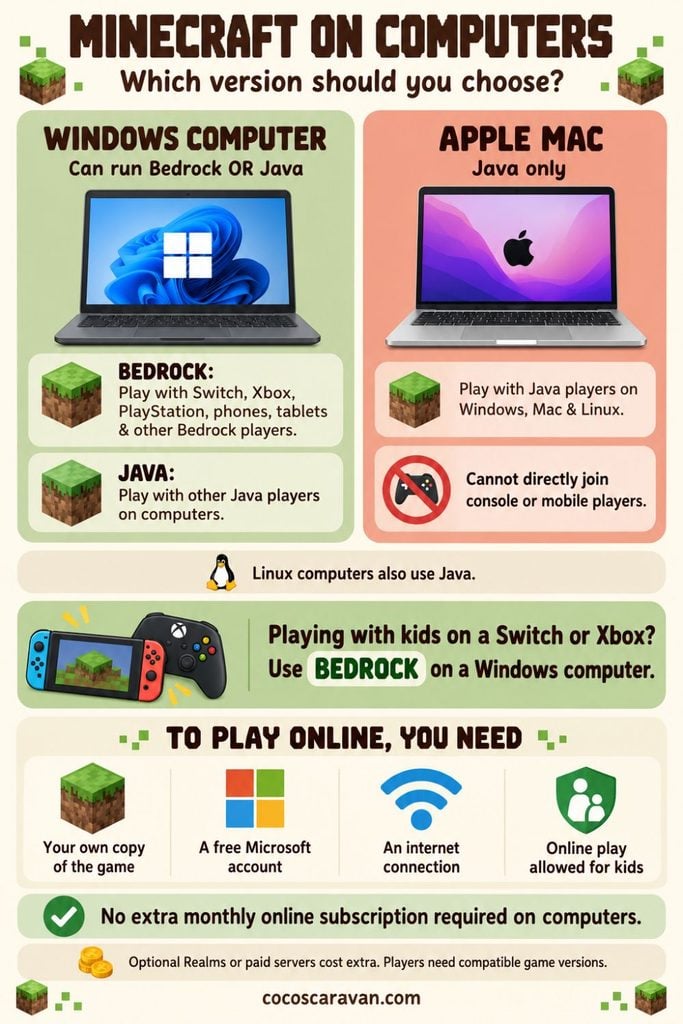
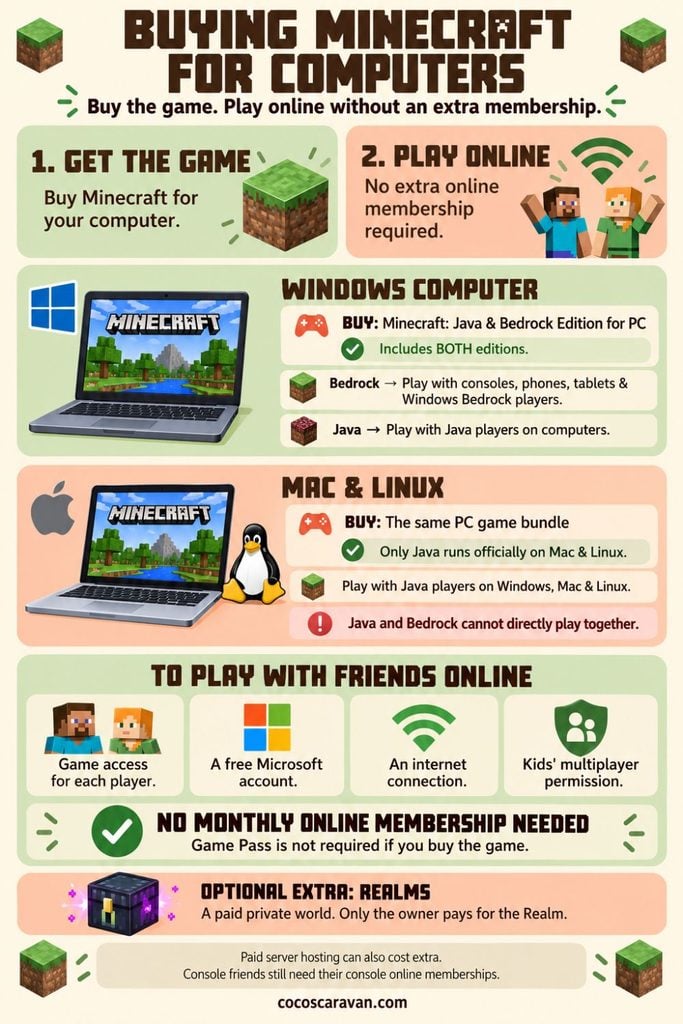
Windows computers have two Minecraft options: Bedrock and Java. Think of these as two separate groups you need to join the same group as your friends. If you’re checking what devices can play Minecraft with your child’s Switch, Xbox, or PlayStation, choose Bedrock. If their friends use Java, choose Java. The computer game bundle includes both, so you select the one you need when opening the game.
Apple Mac Computers: Java Only
If you have an Apple Mac, the official option is Java. When deciding what devices can play Minecraft together, remember that Mac players can join other Java players on computers. They can’t directly join someone playing on a Switch, Xbox, PlayStation, phone, or tablet. Linux computers also use Java.
What Do Computer Players Need to Play Online?
After figuring out what devices can play Minecraft together, computer players need:
- The game: Purchased for the person playing.
- A free Microsoft account: This is their Minecraft login.
- Internet access: To connect with friends or family.
- Parent permission: Children’s accounts need online play turned on.
You don’t need a separate monthly online subscription to play with friends on a computer. Optional extras, such as a Minecraft Realm, can cost more.
Device #2: Mobile Phones and Tablets
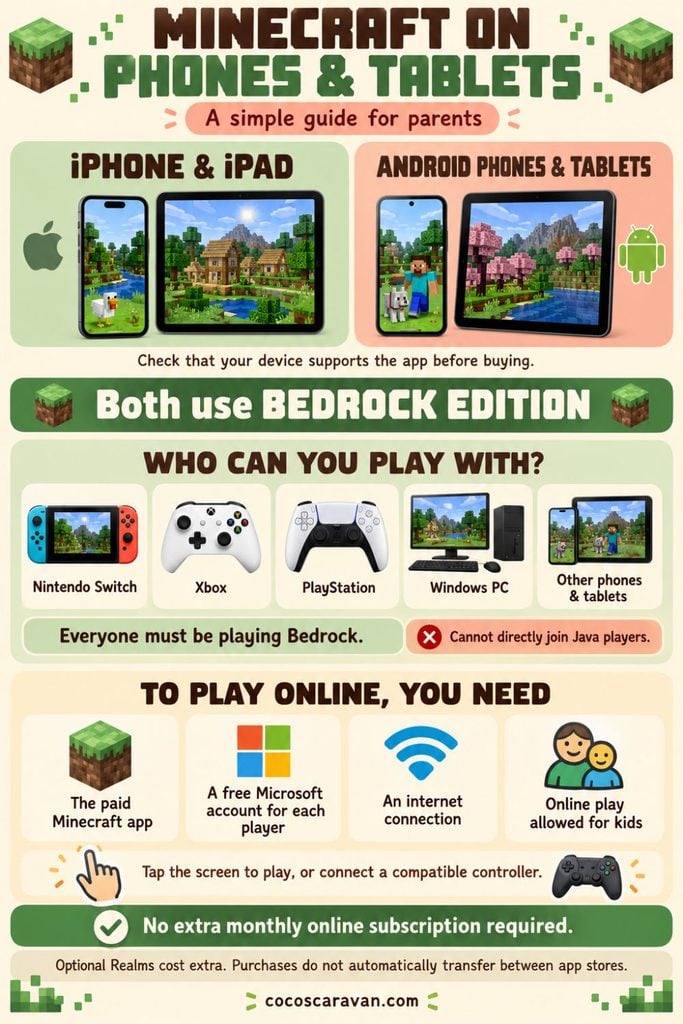
If you’re wondering what devices can play Minecraft, you might already have one sitting on your kitchen counter! Minecraft is available on supported iPhones, iPads, and Android phones and tablets.
These devices use Bedrock Edition, so they can play with other Bedrock players on Switch, Xbox, PlayStation, and Windows computers. You control the game by tapping the screen, or you can connect a compatible controller.
What do you need to play with friends online?
- The Minecraft app: Download the paid game from your device’s app store.
- A free Microsoft account: Each player uses their own login to connect with friends.
- An internet connection: To join each other’s games.
- Parent permission: Children’s accounts need online play turned on.
Phones and tablets don’t require a separate monthly online subscription to play with friends. Optional extras, such as a Minecraft Realm, cost more. Everyone needs a compatible version of the game, and a purchase on one app store doesn’t automatically include the game on other platforms.
Device #3: Consoles
If you’re wondering what devices can play Minecraft, your family’s gaming console might be all you need! Minecraft is available on Nintendo Switch, Xbox One and Xbox Series X/S, and PlayStation 4 and 5.
The current Minecraft game on these consoles uses Bedrock Edition. That means you can play together even on different systems like our family does with Xbox and Switch! You can also join Bedrock players on Windows computers, phones, and tablets.
What do you need to play with friends online?
- Minecraft for your console: You need access to the game on each console being used.
- A free Microsoft account: This lets you connect with Minecraft friends on other devices. Switch and PlayStation players also need their console’s account.
- An internet connection.
- Parent permission: Children’s accounts need online play turned on.
- A paid online subscription: Unlike computers and mobile devices, consoles require an online membership.
How to Play Minecraft Together Without Internet
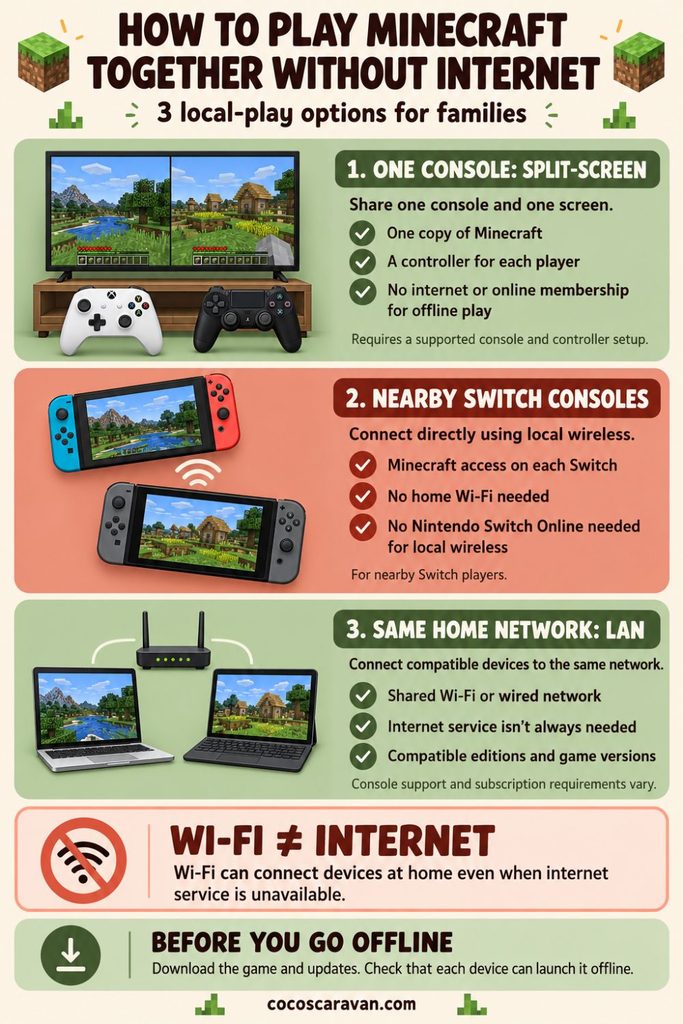
Wondering what devices can play Minecraft together without internet? Here are a few options:
- Share one console with split-screen. Up to 4 players can share one TV, each with their own controller. Personally, I recommend 2 players per TV so everyone has more room to see! You only need one copy of Minecraft for that console, and offline split-screen doesn’t require a paid online membership. Your setup must support split-screen.
- Connect nearby Nintendo Switch consoles. Local wireless connects nearby Switch consoles without home Wi-Fi or Nintendo Switch Online. Each console needs its own copy of Minecraft or access to the game, even when playing without Wi-Fi.
- Use your home network. Compatible devices can play over the same Wi-Fi or wired network, called LAN, without necessarily needing internet service. Each device needs access to Minecraft, and console requirements can vary.
Download the game and updates beforehand. Everyone playing on separate devices needs compatible Minecraft editions and versions!
Buying Minecraft: Do You Need a Copy for Every Device?
When figuring out what devices can play Minecraft, remember that each device being used needs access to the game. Buying Minecraft for a Switch doesn’t also give you the Xbox, PlayStation, or computer version.
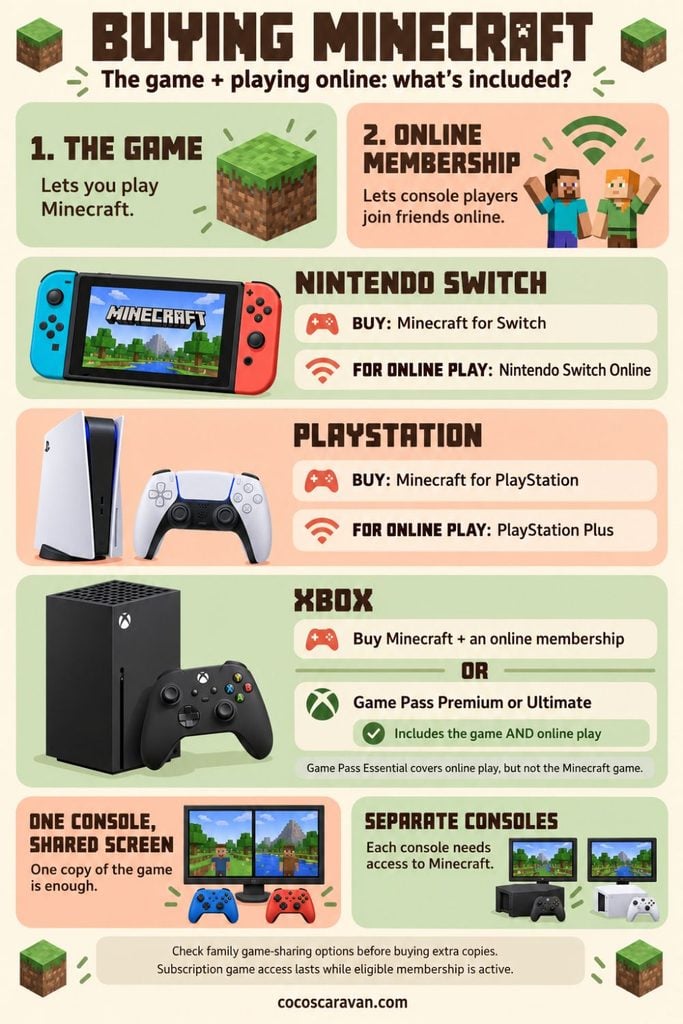
On Nintendo Switch and PlayStation, plan to purchase Minecraft for that system. On Xbox, you can buy it separately or access it through an active Game Pass Premium or Ultimate subscription.
Buying the game and paying to play online are different costs. Switch and PlayStation players need their online memberships in addition to the game. Xbox Game Pass Premium and Ultimate currently include both Minecraft and online console multiplayer.
If everyone plays together on one console using split-screen, you don’t need to buy a copy for each person. If you’re using separate consoles, each needs game access. Digital game sharing rules vary, so check your console’s options before buying extra copies.
Where to Buy Minecraft: Physical vs. Digital
Before buying Minecraft, decide which device your child will play on most. You’re buying the game for that platform purchasing it on Switch doesn’t also give you the computer or Xbox version.
In our house, we have access to Minecraft on Xbox through Game Pass, and I also bought two physical copies for our Nintendo Switches. That way, my boys can each use a game card and play together on separate Switches!
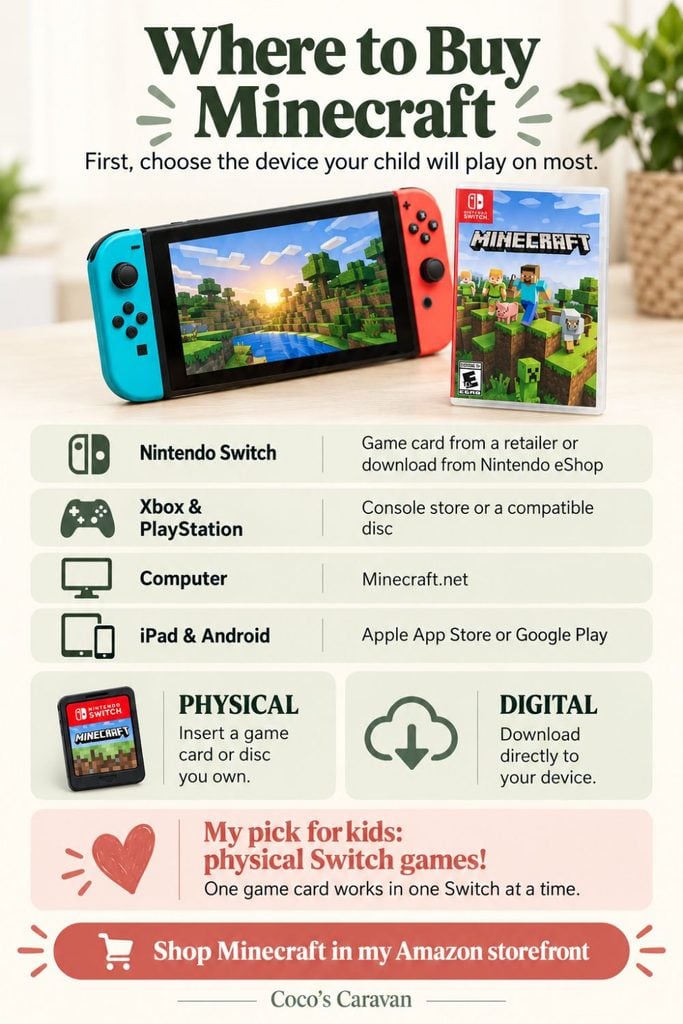
Where Can You Buy It?
- Nintendo Switch: Buy a physical game card from Target, Walmart, Amazon, or GameStop, or download it from the Nintendo eShop.
- Xbox or PlayStation: Buy through the console’s digital store, or get a physical copy if your console has a disc drive.
- Computer: Start at Minecraft.net and choose the version for your computer.
- iPad or Android tablet: Buy through the Apple App Store or Google Play Store.
Physical vs. Digital: What’s the Difference?
Physical means a game card or disc you insert to play. Digital means you download the game onto your device, with no card or disc to keep track of.
I prefer physical games for my kids’ Nintendo Switches. We can move the cards between consoles and share games when they’re taking turns.
But one game card can only be used in one Switch at a time. To play together on separate Switches, each console needs its own copy or access to Minecraft even without Wi-Fi. Playing split-screen on one console only requires one copy!
Shopping tip: Check the packaging! “Digital code” means you’re getting a download code, rather than a physical game card.